
Homepage Sections
The Ark Naturals homepage is built section-by-section in Customize → Home page. Every section below corresponds to one block in the editor.
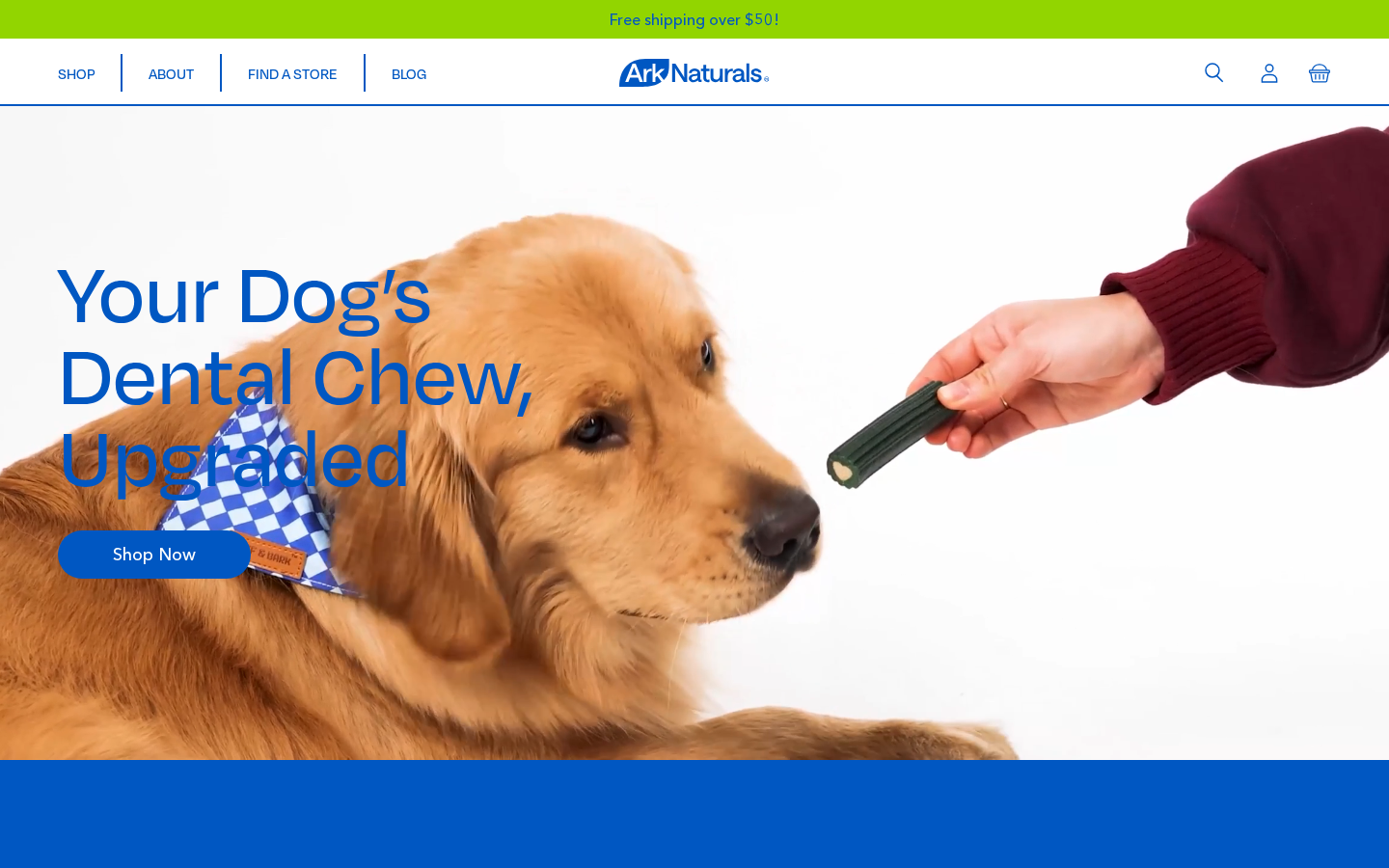
Current homepage order
Sections in the order they appear on the homepage, with active/disabled status from templates/index.json:
| Order | Section | Status |
|---|---|---|
| 1 | Home Hero | Active |
| 2 | Home Target | Active |
| 3 | Home Media Cards | Active |
| 4 | Home Bad Breath | Active |
| 5 | Home Perfect Smile | Active |
| 6 | Home Comparison | Active |
| 7 | Home Healthy | Active |
| — | Countdown Timer | Disabled |
| — | Home Quiz | Disabled |
| — | Home Reviews | Disabled |
| — | Home Gallery | Disabled |
Disabled vs. removed
A disabled section stays in the template but isn't rendered. Use this when you want to temporarily hide a section (e.g. seasonal content) without losing its settings. Re-enable it from the section's toggle in the customizer.
Home Hero
Section file: section-home-hero.liquid
The full-viewport video hero at the top of the homepage. Plays a separate desktop and mobile video, with image fallbacks while the video loads or if autoplay is blocked.
Settings
| Setting | ID | Type | Default / Current |
|---|---|---|---|
| Label | label | Text | (empty) |
| Headline | headline | Text | Your Dog's Dental Chew, Upgraded |
| Subheadline | subheadline | Text | (empty) |
| Body text | text | Rich text | (empty) |
| Button URL | button_url | URL | shopify://collections/all |
| Button text | button_text | Text | Shop Now |
| Desktop video | video_desktop | Video | Homepage-Desktop 2x_5Mbps.mp4 |
| Desktop fallback image | fallback_desktop | Image picker | Poster image shown until the video plays |
| Mobile video | video_mobile | Video | Mobile-5mbps_2x.mp4 |
| Mobile fallback image | fallback_mobile | Image picker | Mobile poster image |
Video format & weight
Use MP4 (H.264) at 5–6 Mbps. Heavier files (10 Mbps+) noticeably hurt mobile load times. Always set both a fallback image and a mobile video — many phones don't autoplay full-quality desktop videos.
Also used on the About Us page
page.about-us.json has a second Home Hero instance (section_home_hero_WBjcXJ) between Home Target and Shop. It works as a plain brand video band:
- Desktop video:
Overview landscape - 15 sec .mp4, the same file as the PLP grid video. - Fallback images
C9A1420_1_2.png(desktop) /C9A1420_1_3.png(mobile). No mobile video is set. - All text/button fields are empty, and the section's Custom CSS hides the text container (
.container {display: none;}) and forces the video to flow in the layout (.hero-autoplay {position: relative !important; display: block !important;}).
To swap the video, open Customize → Pages → about-us → Home Hero (the second one) and change Desktop video. Keep the custom CSS, or the empty headline area will reappear over the video.
Home Target
Section file: section-home-target.liquid
A scroll-triggered parallax section with four floating, rotated product images around a central headline + CTA. Each image has independent rotation, vertical offset, and (for mobile) horizontal shift controls so designers can fine-tune the composition.
Content settings
| Setting | ID | Type | Current |
|---|---|---|---|
| Headline | headline | Text | Fresh Kisses Await |
| Body text | text | Textarea | "They're more than just a breath mint — our chews tackle plaque & tartar…" |
| Button URL | button_url | URL | /collections/all |
| Button text | button_text | Text | Shop Now |
Image settings (desktop)
| Setting | ID | Type |
|---|---|---|
| Left image #1 | image_left_1 | Image picker |
| Left image #2 | image_left_2 | Image picker |
| Right image #1 | image_right_1 | Image picker |
| Right image #2 | image_right_2 | Image picker |
Each image has independent rotation (*_rotation, degrees), vertical offset (*_top, px) and (for the second image on each side) horizontal shift (*_shift, %).
Image settings (mobile)
Mobile uses prefixed mob_* versions of the same fine-tuning controls plus image-width sliders (mob_image_1_width, mob_image_2_width) and a column-edge spacing setting (mob_col_edge).
Composing this section
The four image slots are usually filled with product cut-outs on transparent backgrounds. Use subtle rotations (±10–20°) to give a playful feel without distracting from the central CTA.
Home Media Cards
Section file: section-home-media-cards.liquid
A 2-column grid of large media cards. Each card can play its own video (with separate desktop/mobile sources and a poster image), and includes a title, description, and link.
Blocks (max 2): media_card
| Setting | Type | Purpose |
|---|---|---|
| Title | Text | Card title (e.g. "Brushless Toothpaste") |
| Description | Textarea | Short supporting copy |
| Link text | Text | CTA label (default: Shop now) |
| Link URL | URL | Card destination |
| Desktop video | Video | Main animated content (desktop) |
| Mobile video | Video | Lighter video file for mobile |
| Fallback image | Image picker | Poster shown until video loads |
Currently configured cards:
- Brushless Toothpaste →
ark-naturals-original-brushless-toothpaste - Protection+ →
ark-naturals-protection-plus-brushless-toothpaste
Home Bad Breath
Section file: section-home-bad-breath.liquid
A full-width section with a background image (separate desktop and mobile versions), a headline, and up to 5 expandable text blocks. Currently used to highlight Ark's three differentiators (Functional Ingredients, Oral Care, Delicious Taste).
Section settings
| Setting | ID | Type | Current |
|---|---|---|---|
| Eyebrow | eyebrow | Text | (empty) |
| Headline | headline | Text | A Healthy Mouth, Every Day |
| Desktop background image | background_image | Image picker | Block_6_-_Peridontal_Disease_2.png |
| Mobile background image | background_image_mobile | Image picker | Block_5_-_Value_Props_NEW.png |
| Button URL | button_url | URL | /collections/all |
| Button text | button_text | Text | Shop Now |
Blocks (max 5): text_block
| Setting | Type | Purpose |
|---|---|---|
| Title | Text | Block heading |
| Text | Textarea | Block body copy |
Currently configured blocks: Functional Ingredients · Oral Care For Every Pet · Delicious Taste
Home Perfect Smile
Section file: section-home-perfect-smile.liquid
A product carousel laid over a large lifestyle video. Used to surface up to 6 hero products underneath the visual.
Section settings
| Setting | ID | Type | Purpose |
|---|---|---|---|
| Headline | headline | Text | Optional section heading |
| Desktop video | video | Video | Background video (desktop) |
| Mobile video | video_mobile | Video | Background video (mobile) |
| Button URL | button_url | URL | CTA destination |
| Button text | button_text | Text | CTA label (default: Shop Now) |
Blocks (max 6): product_card
| Setting | Type | Purpose |
|---|---|---|
| Product | Product | Product to feature in the carousel |
Currently configured products:
ark-naturals-original-brushless-toothpasteark-naturals-soft-shield-protection-plusark-naturals-protection-plus-brushless-toothpaste-value-packark-naturals-gentle-digest
Home Comparison
Section file: section-home-comparison.liquid
A side-by-side comparison table — Ark Naturals vs. Traditional Chews — with check / X marks per feature row. Floating product images decorate the top and bottom corners.
Section settings
| Setting | ID | Type | Current |
|---|---|---|---|
| Ark logo | logo | Image picker | Logo.svg |
| Button URL | button_url | URL | /collections/all |
| Button text | button_text | Text | Shop Now |
| Top floating image — desktop | float_image_top_desktop | Image picker | — |
| Top floating image — mobile | float_image_top_mobile | Image picker | — |
| Bottom floating image — desktop | float_image_bottom_desktop | Image picker | — |
| Bottom floating image — mobile | float_image_bottom_mobile | Image picker | — |
Blocks (max 10): row
Each block is one feature row in the table.
| Setting | Type | What it does |
|---|---|---|
| Label | Text | Feature name (e.g. "Long Term Fresh Breath Support") |
| Ark check | Checkbox | Render a checkmark in the Ark column (uncheck = X) |
| Traditional check | Checkbox | Render a checkmark in the Traditional column (uncheck = X) |
Currently configured rows: Cleaning Through Scraping · Reduces Plaque & Tartar Through Functional Ingredients · Long Term Fresh Breath Support · Oral Microbiome Support · Added Antioxidants · Natural Colors & Flavors.
Best practice
Keep the table to 5–7 rows. Anything more becomes hard to scan on mobile. Phrase rows as positives (something the product does) so the green checks read as wins.
Home Healthy
Section file: section-home-healthy.liquid
Two-column text + image layout that handles the "education" moment of the page — typically a stat about pet dental health plus a CTA.
Settings
| Setting | ID | Type | Current |
|---|---|---|---|
| Headline | headline | Text | Bad Breath is Just the Beginning |
| Body content | content | Rich text | Education copy about periodontal disease (HTML supported) |
| Image | image | Image picker | Oral_Care_Image.png |
| Button URL | button_url | URL | /collections/all |
| Button text | button_text | Text | Shop Now |
| Source citation | source_text | Rich text | Footnote with source link (e.g. AVMA) |
Citing sources
The Source citation field is meant for the small footnote text under the body (e.g. "Source: ¹ American Veterinary Medical Association…"). Use a real superscript number to tie the citation to the claim above.
Home Reviews (currently disabled)
Section file: section-home-reviews.liquid
A carousel of curated customer reviews — each with a product reference, image, star rating, headline, body, and author.
Blocks (max 6): review_card
| Setting | Type | What it does |
|---|---|---|
| Product | Product | Product the review is about |
| Image | Image picker | Custom photo (overrides product image) |
| Stars | Range 1–5 | Star rating |
| Review headline | Text | Review title |
| Review text | Textarea | Review body |
| Author | Text | Reviewer's name (e.g. Sarah K.) |
| Read more URL | URL | Link to the full review or product page |
Disabled on the homepage
The site shows Junip review widgets on each PDP instead of this curated carousel. Enable the section from its toggle in the customizer to show it on the homepage.
Home Gallery (currently disabled)
Section file: section-home-gallery.liquid
An 8-tile Instagram-style gallery grid. Each tile can be a static image, a video URL, or a link.
Section setting
| Setting | ID | Type | Default |
|---|---|---|---|
| Headline | headline | Text | We Love Our Happy Pets And Pet Parents… |
Blocks (max 8): gallery_item
| Setting | Type | Purpose |
|---|---|---|
| Image | Image picker | Tile image |
| Video URL | Text | Optional MP4 URL — if set, replaces the image with looping video |
| Link | URL | Tile destination |
Home Quiz (currently disabled)
Section file: section-home-quiz.liquid
Small CTA bar pointing customers to the on-site quiz at /pages/quiz.
Settings
| Setting | ID | Type | Default |
|---|---|---|---|
| Headline | headline | Text | Not Sure Where To Start? |
| Description | text | Textarea | Take our quiz (less than 5 minutes) and find the perfect chew for your pet. |
| Button URL | button_url | URL | /pages/quiz |
| Button text | button_text | Text | Take Our Quiz |
Countdown Timer (currently disabled)
Section file: section-timer.liquid
A countdown to a launch / restock date, plus an email-capture form that posts to the global Klaviyo list.
Settings
| Setting | ID | Type | Default |
|---|---|---|---|
| Subheadline | subheadline | Text | New Site Launches In |
| Headline | headline | Text | Check Back May 15th For Full Experience |
| Deadline | deadline | Text | 2026-05-15T00:00:00 |
| Email placeholder | email_placeholder | Text | Email Address |
| Button text | button_text | Text | Notify Me |
| Success message | success_message | Text | Thanks — we'll be in touch! |
Deadline format
Enter the deadline in YYYY-MM-DDTHH:MM:SS format. The countdown is calculated against the visitor's local time (so the timer hits zero on the same wall-clock moment everywhere).
Other reusable sections
These can be added to the homepage from the Add section menu, but are also reused on other templates. Their full settings are documented in Product Pages and on dedicated reference pages.
| Section | Where it's commonly used | Reference |
|---|---|---|
section-banner.liquid | Promo banners, any template | (Banner — image + headline + CTA) |
section-hero.liquid | Sub-page hero | (Hero — image + headline + CTA) |
section-newsletter.liquid | Footer-adjacent signup | (Newsletter — headline + body + Klaviyo form) |
section-quotes.liquid | Testimonial carousel | (Quotes — up to 3 testimonial blocks) |
section-tabs.liquid | Long-form content | (Tabs — accordion with up to N tabs) |
section-shop.liquid | Standalone CTA bar | (Shop — text + button) |
section-other-brands.liquid | Store locator page | "Looking For Our Other Brands?" square brand tiles. See Store Locator → Other Brands. |
section-blended-review-widget.liquid | Product templates | Script-only, no visual output. See Integrations → Blended reviews. |