
Collection Pages (PLP)
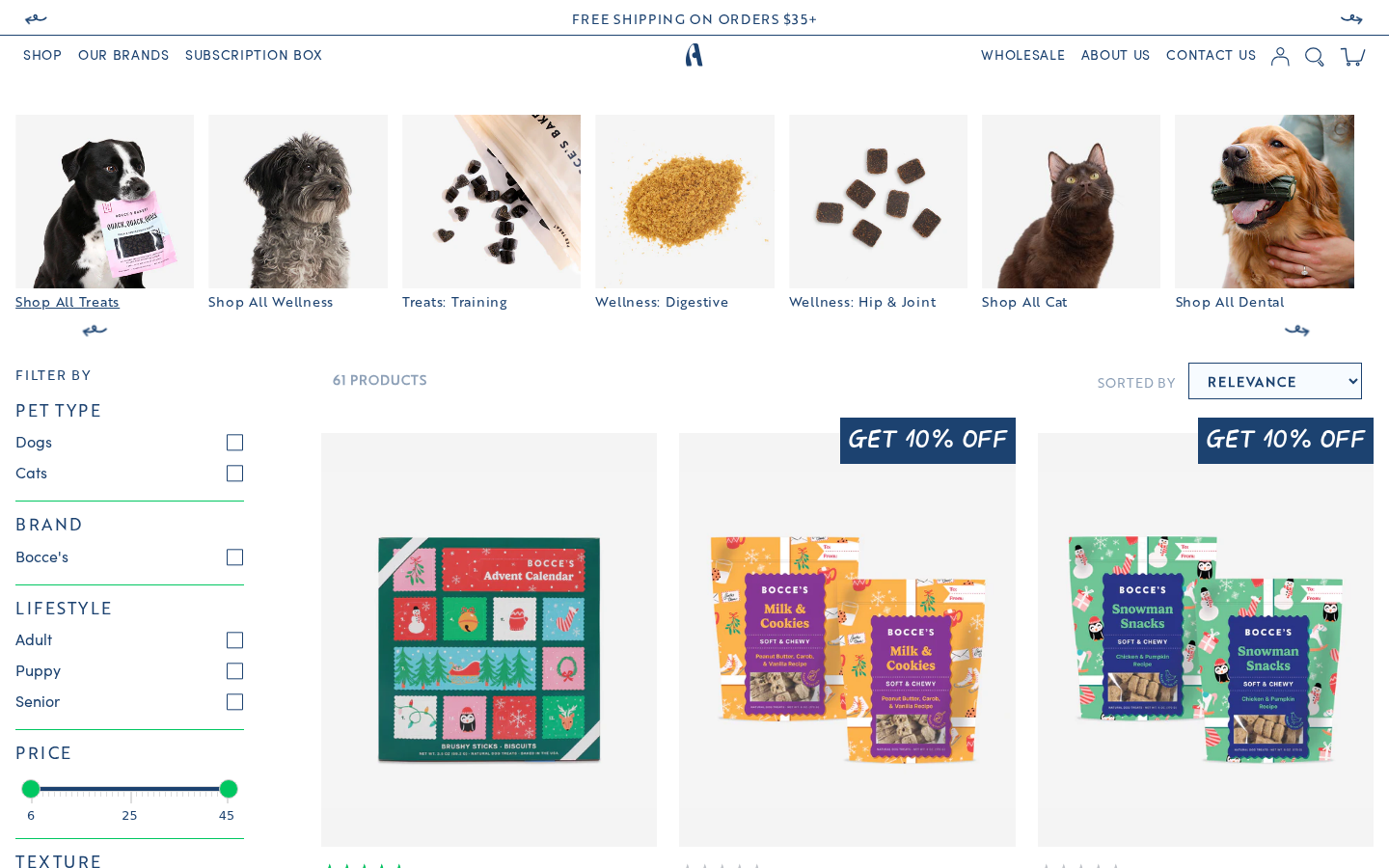
Overview
The collection page is defined by templates/collection.json, which uses main-collection as the primary section followed by a Follow Us section (section-follow).
The PLP is fully native Shopify. The product grid is server-rendered Liquid, filters come from Shopify's Search & Discovery app (collection.filters), and filtering / sorting / load-more re-fetch the section through the Section Rendering API (assets/collection.static.js).
ais-* class names
The PLP markup uses InstantSearch-style ais-* class names, which the styles in snippets/plp.css.liquid and src/css/components/plp-overrides.scss target. Don't rename ais-* classes -- the CSS depends on them.
Theme A vs Theme B
The store runs two theme variants (see Overview > Deployment). They share the same filter/sort/card code but lay the PLP out differently:
Theme A (main, live) | Theme B (staging) | |
|---|---|---|
plp_version value | v1 (ignored -- A's section has no v2 branch) | v2 |
| Layout | Single product grid (one card per variant) | Banner + product slider per sub-collection (<plpv2> Vue) |
| Products per request | 50, then auto load-more | 500 (whole collection at once) |
| Price-range variant trimming | No | Yes (see below) |
Main Collection Section
Section file: sections/main-collection.liquid (no section settings -- everything is driven by theme settings and metafields)
Layout (Theme A)
- Category chip slider --
<categories>Vue component fed byhelper_plp_categories(only collections withcustom.active_on_plporcustom.plpv2_enableare serialised) - Filter sidebar --
collection-filterssnippet, only rendered whencollection.filtersis not empty. A "Show filters / Hide filters" toggle (.ais-facets-button) drives the mobile drawer - Header row -- result count, active filter chips (
collection-current-refinements), and the sort dropdown (collection-sort) - Product grid --
ol.ais-Hits-listofproduct-cardsnippets - Load-more sentinel -- the first page is server-rendered;
collection.static.jsappends the next page automatically as the shopper scrolls. Alayout-paginationfallback renders insidenoscript
Card Granularity
| Setting | ID | Type | Current value |
|---|---|---|---|
| PLP card granularity | plp_card_granularity | Radio (variant / product) | variant (default, not overridden) |
variant-- one card per variant (a product with 5 variants shows 5 cards)product-- one card per product (exact pagination and filter counts)
The same setting is used by the search results page.
Hidden Products and Variants
| Rule | Effect |
|---|---|
Product tag internal_only | Product never renders on PLP, search or predictive search |
Product tag algolia-ignore | Same as above (2 products use it) |
Variant metafield custom.hide_on_plpv2 = true | That variant gets no card (grid and v2 sliders) |
hide_on_plpv2 theme setting is unused
settings_data.json contains a hide_on_plpv2 key, but it is not in the schema and nothing reads it. Use the variant metafield custom.hide_on_plpv2 instead.
Filters
Snippets: snippets/collection-filters.liquid, snippets/collection-filter-price.liquid, snippets/collection-current-refinements.liquid
Filters are Shopify Search & Discovery filters. The tag filter is regrouped in Liquid: every product tag written as Group:Value (e.g. Pet Type:Dogs, Brand:Bocce's Bakery) becomes a value in the Group filter panel. Grouping is case-insensitive, so brand: and Brand: merge.
| Setting | ID | Type | Current value |
|---|---|---|---|
| PLP filter group order | plp_filter_order | Text (comma-separated) | Pet Type, Brand, Lifestyle, Price, Texture, Wellness (default) |
The setting is an allowlist
A tag group only renders if it is named in plp_filter_order. The catalogue also carries Diet: and Treats: tags that are intentionally hidden. To add a new filter group, add its name to this setting (and tag products NewGroup:Value).
- Values inside a group are sorted by count (descending), then name
- Price is a two-handle range slider (
filter.v.price.gte/.lte); the scale starts at the cheapest product in the result set - Active filters show as removable chips next to the product count (group prefix stripped, e.g. "Dogs")
- Filter URLs use Shopify's native params, e.g.
?filter.p.tag=Pet+Type:Dogs
Algolia-style filter URLs
collection.static.js rewrites Algolia-style filter URLs (?refinementList[named_tags.Pet Type][0]=Dogs) to ?filter.p.tag=Pet Type:Dogs on load, so email/ad deep links in that format land on the right filtered view.
Where to configure: Shopify Admin > Apps > Search & Discovery > Filters (enable the product tag filter and price), plus Theme Settings > PLP Settings > plp_filter_order.
Sorting
Snippet: snippets/collection-sort.liquid
| Label | sort_by value |
|---|---|
| Relevance | (none -- the collection's own sort order) |
| Most popular | best-selling |
| Name | title-ascending |
| Newest first | created-descending |
"Relevance" uses the collection's admin sort order, so setting a collection to Manual in Shopify Admin lets merchandisers drag-and-drop the PLP order.
Product Card
Snippet: snippets/product-card.liquid
Each card shows: stock/trending badge, discount badge ("Get X% off" when a compare-at price is set), image, rating line, title (Product - Variant), price + struck-through compare-at price, "N options" pill, and the Quick Add row. Card links go to /products/<handle>?variant=<id>.
Badges
| Badge | Condition | Text setting |
|---|---|---|
| Out of Stock | Variant inventory < 5 | outOfStock ("Out of Stock") |
| Low Stock | Variant inventory < 100 | lowStock ("Low Stock") |
| Trending | Product tagged bestseller | trending ("Trending") |
Only one badge shows (out of stock > low stock > trending). The thresholds are hard-coded in the snippet.
Priority settings are not used
The ls / oos / trn priority numbers in Theme Settings > PLP Settings are not read by any template -- the order above is fixed in product-card.liquid.
Out-of-stock cards replace "Quick Add" with a Find Store link to /pages/store-locator.
Rating Line
Snippet: snippets/product-card-rating.liquid + assets/product-card-rating.static.js
- Products with blended review metafields (sources include
amazonorchewy) render rating + green stars + count in k-notation server-side (see Blended Reviews) - Other products fall back to Junip; the ratings for every card on the page are fetched in one batched Junip API request
- A product with no reviews keeps the line's height but hides it (
invisible), so cards stay aligned
Quick Add
Custom element: quick-add-variants (assets/quick-add.static.js) · Section: sections/product-card-quick-add.liquid
- The variant options are fetched once per product (
/products/<handle>?sections=product-card-quick-add), cached, and only when the card comes within ~400px of the viewport - Desktop: hovering the card slides its content up and reveals the option panel above the Quick Add row; hovering an option previews that variant on the card (title, image, price, compare-at) without another request
- Mobile: the option list is always open; more than 3 options collapse behind a "Show More" button
- Clicking an option adds it to cart optimistically -- the mini cart draws the line immediately and the request runs behind it (see Cart & Checkout > Optimistic Cart Updates)
Theme B: PLP v2 (Sliders)
When plp_version is v2 (Theme B only), main-collection renders the same filter sidebar / sort header, then:
snippets/collection-plpv2-hits.liquidemits a JSON feed ([data-plpv2-hits]) of variant-level records (up to 500, same skip rules as the grid, plus blended review metafields)collection.static.jsreplays that feed as theantelope:collection-productsevent (and parks it onwindow.antelopepets.plpv2Hits), which<plpv2>(src/vue/components/PLP/plp-v2.vue) groups into one banner + slider per sub-collection flaggedcustom.plpv2_enable- Slider cards (
plp-v2-slider.vue) have the same hover/quick-add preview behaviour as the grid - The PLPv2 Collections Ranker (
collection_list_ranker:bocces-bakery,super-snouts,ark-naturals) orders the brand sliders viahelper-ranker, andshowDesc(currentlyfalse) toggles the slider description
Price filter on variant cards (Theme B)
Shopify's price filter matches at product level. Theme B's grid and v2 feed additionally drop variants outside the active price range, so filtering $30-55 doesn't show a product's $24 variant. Theme A does not trim variants by price.
/collections/all Page
The "all collections" page (/collections/all) always renders a grid of collection tiles:
- Iterates through all collections
- Only shows collections where
collection.metafields.custom.active_on_plpis set - Displays collection image, title, and link
Search Results Page
Section file: sections/main-search.liquid
Native Shopify search:
- Centered search input; searches
type=product,article - Results are split into a Products grid (using
product-card, respectingplp_card_granularity) and a Posts grid (blog articles) - 24 results per page
- A trailing
*wildcard is appended on submit so partial words match (the same as the header dropdown) - Products tagged
internal_only/algolia-ignoreare excluded
The header dropdown is documented in Layout Sections > Search.
PLP Banner and PLP Follow Us (legacy settings)
Theme Settings > PLP Settings contains the PLP Banner (plpVisible, plpHeading "Meet Antelope", plpText, plpLink, plpUrl, plpImg, plpImgM) and PLP Follow Us (plpFollowVisible, plpFollow) settings.
Not rendered
No template reads these settings. The Follow Us feed on collection pages comes from the section-follow section in collection.json, not from plpFollow.
Collection Template Structure
collection.json:
sections:
  main -> main-collection (filters, sort, grid / v2 sliders)
  2ae2cecc-... -> section-follow (Instagram feed)
Collection Metafields
| Metafield | Purpose |
|---|---|
custom.active_on_plp | Shows the collection on /collections/all and in the category chip slider |
custom.plpv2_enable | Theme B: collection gets its own banner + slider on PLP v2 |
custom.plpv2title, custom.plpv2_description | Theme B: v2 banner heading / text |
custom.plpv2_image, custom.plpv2_mobile_image, custom.plpv2_swap | Theme B: v2 banner images and image/text swap |
custom.brand_logo, custom.brand_tagline | Used by the homepage brands section |
custom.use_custom_url, custom.custom_url | Override URL for collection links |
Product / Variant Data Used on the PLP
| Data | Purpose |
|---|---|
Tags Group:Value | Filter groups (see Filters) |
Tag bestseller | Trending badge |
Tags internal_only, algolia-ignore | Hide product |
Variant metafield custom.hide_on_plpv2 | Hide variant card |
reviews.* metafields | Blended rating on cards |