
Product Pages
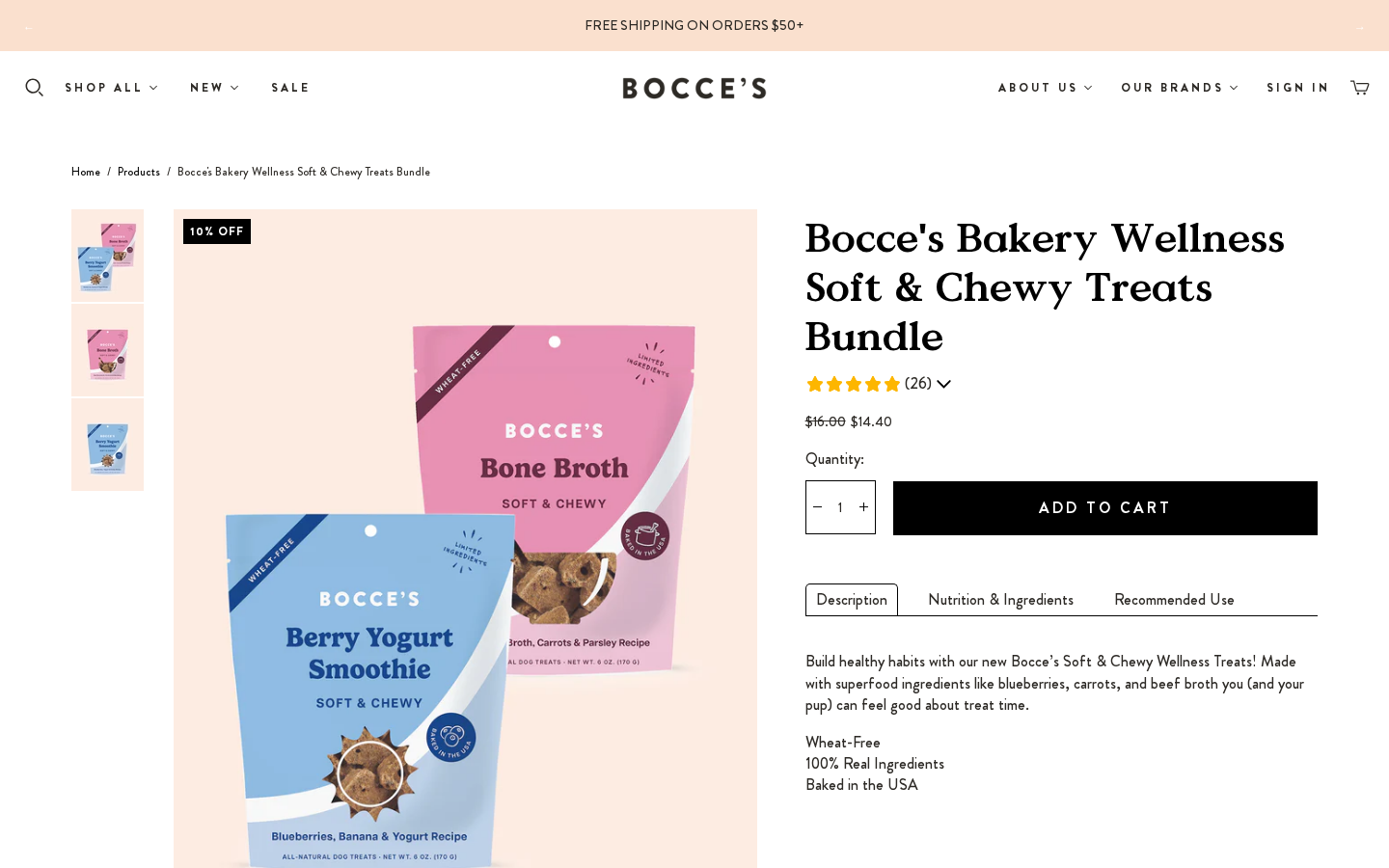
Overview
Most PDP templates are legacy .liquid templates that include a fixed list of sections. You can edit each section's settings in the customizer, but you cannot add, remove or reorder sections: that needs a code change to the template file.
| Template | File | Purpose |
|---|---|---|
| Default | product.liquid | Standard product |
| Bubble | product.bubble.liquid | Default PDP + ambient bubble animation, for spa / wash products |
| Build Your Bundle | product.build-your-bundle.liquid | Bundle builder product |
| Cat | product.cat.liquid | Cat products (static-cat-ingredients instead of dog ingredients) |
| Halloween | product.halloween-product.liquid | Seasonal |
| Quantity Upsells | product.quantity-upsells.liquid | PDP with quantity upsells |
| No ATC | product.no-atc.liquid | Product + recommendations only (no reviews) |
| Supplement | product.supplement.liquid | Supplement PDP |
| Baskets | product.baskets.json | Gift baskets |
| ReCharge Bundle | product.recharge-bundle.json | ReCharge bundle widget (app block only) |
| AJAX | product.ajax.liquid | Product payload for quick shop |
To assign: Shopify Admin > Products > [Product] > Theme template
Theme B only
Theme B also has product.limited-edition.json.
Default PDP layout
product.liquid renders these sections, in order:
| # | Section | Notes |
|---|---|---|
| 1 | static-product | Gallery, buy box, subscription widget, reviews summary, persistent ATC bar |
| 2 | static-ingredients | "Our Recipe / Includes These Ingredients!" |
| 3 | section-help-la-fires | LA fires donation cards. Currently disabled (enable: false) |
| 4 | section-blended-review-widget | Script only: blended Amazon/Chewy numbers in the Junip summary |
| 5 | Junip review widget | render 'junip-product-review' |
| 6 | static-product-recommendations | "Your Pet Will Also Love". See Product Recommendations |
build-your-bundle, halloween-product, quantity-upsells, cat and supplement follow the same pattern. product.bubble.liquid is the default layout without the blended widget, plus section-bubble-animation.
section-ai-block.liquid ("See what AI knows about this product") is not included in any product template. The section file and its settings in settings_data.json exist, but it doesn't render anywhere.
Static Product Section
Section file: static-product.liquid → snippets/product.liquid (editor name Product pages)
| Setting | ID | Type | Current |
|---|---|---|---|
| Product details alignment | details_alignment | select | left |
| Variant options style | variant_options_style | select | radio |
| Show variant SKU | show_variant_sku | checkbox | false |
| Show Flavor | product-flavor | checkbox | false |
| Show breadcrumbs | show-breadcrumbs | checkbox | true |
| Show quantity selector | product-quantity-option | checkbox | true |
| Show email link | product-email-link | checkbox | false |
| Show dynamic checkout button | show_spb | checkbox | true |
| Enable cart redirection | enable_cart_redirect | checkbox | false |
| Enable social sharing | social-sharing-buttons | checkbox | false |
| Enable Persistent ATC | persistent-atc | checkbox | true |
| Url build your bundle | url-build | url | /products/build-your-bundle |
| Enable image zoom | image-zoom | checkbox | true |
| Product thumbnail position | thumb-orientation | select | left-right |
Key features
- Image gallery with zoom
- Variant selector (radio)
- Quantity + Add to Cart, which adds to the drawer instantly (see Instant cart updates)
- Subscription widget (
subscription-product.liquid, ReCharge) - Reviews summary under the title (
junip-product-summary.liquid). See Reviews - "See Discounted Price in Bag" note for products in the
salecollection. See Sale pricing - Persistent ATC bar: a sticky bar with image, title, price, the discount note (compact) and a Buy Now button
- Stock handling shared with product cards: FIND STORE, SHOP ONLINE or OUT OF STOCK, driven by the
custom.find_in_store_option,custom.not_in_storeandcustom.ossmetafields. See Product card - Klaviyo back-in-stock form for sold-out variants (the
klaviyo-bis-triggerbuttons; the Klaviyo snippet itself is rendered inlayout/theme.liquid) - No wishlist button: the Swym script loads globally, but
swym-product-view.liquidisn't included anywhere
Reviews
Reviews come from Junip. For products that are also sold on Amazon and Chewy, the theme shows a blended rating from product metafields in the reviews namespace. The reviews.* metafields are written by an external daily sync:
| Metafield | Used for |
|---|---|
reviews.amazon_reviews, reviews.chewy_reviews | If either is > 0, the product "has external reviews" |
reviews.blended_rating, reviews.blended_count | Blended average and total shown instead of Junip's on-site figures |
junip.rating_average, junip.rating_count | On-site figures (default) |
Summary under the title (snippets/junip-product-summary.liquid):
- Site-only products keep the
junip-product-summaryclass, so the Junip SDK renders its native summary with a per-star breakdown dropdown. - Products with external reviews drop that class, so the SDK leaves them alone. The theme renders the blended average and count itself, and hides the breakdown chevron because there is no per-star data.
- Counts use thousands separators (1,234).
Blended Review Widget (sections/section-blended-review-widget.liquid, on both themes):
- It renders no visible block, only a script.
- For products with external reviews, it waits for Junip's review widget and overwrites the average, star fill and count with the blended values.
- The count reads, for example, "3,708 Reviews across all platforms".
- It hides the per-star distribution bars.
- Settings (
padding_top,padding_bottom,custom_class) exist but only affect the wrapper.
Bubble Animation
Section file: section-bubble-animation.liquid. It is only included in product.bubble.liquid.
The section draws a decorative canvas of soap bubbles that rise up the page. The canvas doesn't respond to clicks, and it is not shown to visitors who prefer reduced motion. To edit it, open a product that uses the bubble template in the customizer; the section appears as Bubble animation.
| Setting | ID | Type | Default |
|---|---|---|---|
| Enable bubble animation | bubble_enabled | checkbox | true |
| Number of bubbles | bubble_count | range 0–80 | 26 |
| Max bubble size | bubble_max_size | range 8–60 | 26 |
| Rise speed | bubble_rise_speed | range 20–300 (%) | 100 |
| Opacity | bubble_opacity | range 10–150 (%) | 100 |
| Bubble color | bubble_color | color | #ffffff |
| Bubble rim color | bubble_rim_color | color | #e7feff |
| Layer | bubble_layer | select | front (or behind content) |
Product Recommendations
Section file: static-product-recommendations.liquid (editor name Recommended products). Same on Theme A and Theme B.
| Setting | ID | Current |
|---|---|---|
| Show dynamic recommendations | show_product_recommendations | true |
| Heading | product_recommendations_heading | "Your Pet Will Also Love" |
The section is a static {% section %} in every .liquid PDP template, so its settings are shared by all product pages.
The toggle only shows or hides the row
"Show dynamic recommendations" doesn't switch between dynamic and manual products. Turning it off removes the "Your Pet Will Also Love" row from every PDP.
How the products are picked
The theme doesn't choose the products. Shopify's built-in recommendation engine does:
- On page load,
StaticProductRecommendations(insrc/atlantic.js) requests/recommendations/products?section_id=static-product-recommendations&limit=4&product_id=<id>. - Shopify returns the section rendered with its
recommendationsobject, and the JS puts that HTML into[data-product-recommendations]. - No
intentis passed, so Shopify uses the defaultrelatedintent. The limit of 4 is hard-coded in the section (the API allows 1–10).
Shopify keeps a ranked list of up to 10 related products per product, and the row shows the top 4. The ranking uses:
| Signal | What it means |
|---|---|
| Purchase history | Products bought together in the same orders. Orders imported from another platform aren't counted. |
| Product description | Products with similar descriptions. Shopify's help center says this only works on English storefronts. |
| Related collections | Products from the same collections, excluding all and frontpage. Used only as a fallback when the two signals above have nothing, which is typical for new products with no sales. |
Shopify recalculates often and doesn't publish a schedule, so the row can differ between visits. A product is never recommended if it is:
- sold out (unless Continue selling when out of stock is on)
- priced at $0, or a gift card
- draft, unlisted, or not published to the Online Store
- already in the visitor's cart, or the product being viewed
We can't change the weighting or exclude specific products from the automatic list.
Merchandising: pinning products to slots
Use the free Shopify Search & Discovery app. Its picks come back from the same /recommendations/products endpoint, so no theme change is needed.
- Shopify Admin > Apps > Search & Discovery > Product recommendations, then open the product.
- Under Related products, add up to 10 products. The list order is the slot order on the PDP.
- Keep auto-generated recommendations on. Manual picks then fill the first slots and Shopify fills the rest. Choosing to show only manual picks makes the whole row manual.
- To change many products at once, select them on the Recommendations page and click Bulk edit. This writes the Related products metafields and replaces each product's existing list.
Example: to push The Whole Holiday Bundle in slot #1 on Holiday Menu PDPs, add it as the first related product on each Holiday Menu product. Slots 2–4 stay dynamic.
- Picks are set per product. Products added later don't get them automatically.
- Picks don't expire. Remove them when the campaign ends.
- A pick follows the same rules as the dynamic list. If it's sold out or already in the cart, it's skipped and the next product moves up.
- The app's preview often differs from the storefront because the dynamic part changes.
Pinning one product across all PDPs
The admin has no setting that pins a product on every PDP at once. Doing that from one place would need a theme change. The plan would be optional pinned product pickers for slots 1–4 in this section, optionally limited to one collection, with dynamic results filling the empty slots and duplicates removed. This isn't built yet.
Shopify references: Search & Discovery: product recommendations · How related products are generated · Product Recommendations API
Ingredients
Section file: static-ingredients.liquid (Dog Ingredients list). The cat template uses static-cat-ingredients.liquid.
| Setting | ID | Current |
|---|---|---|
| Heading | title | "Our Recipe" |
| Subheading | subheading | "Includes These Ingredients!" |
| Ingredients List Reference | ingredients_list | ingredients menu |
| Ingredients Tag Reference | ingredients_tag_ref | ingredients- |
| Background | bg_color | #fae0ce |
Product tags starting with ingredients- are matched against the links in the ingredients navigation menu. These are the same tags the PLP Ingredient filter uses.
Supplement Product Template
Template: product.supplement.liquid
| Section | File | Description |
|---|---|---|
| Supplement Product | static-supplement-product.liquid | Main supplement PDP |
| Ingredients | static-supplement-ingredients.liquid | Ingredient breakdown |
| Image + Icon Rows | static-supplement-image-with-icon-rows.liquid | Feature grid |
| Image + Bullet List | static-supplement-image-with-bullet-list.liquid | Benefits with icons |
| Testimonials | static-supplement-testimonial-list.liquid | Product testimonials |
| Collapsible Content | static-supplement-collapsible-content.liquid | Accordion for details |
| Blended Review Widget + Junip | Same as default PDP |
Baskets Template
Template: product.baskets.json. Sections: dynamic-baskets-hero → baskets (Vue render-baskets-options) → dynamic-whats-inside → static-supplement-image-with-icon-rows → static-supplement-collapsible-content → static-supplement-testimonial-list.
ReCharge Bundle Template
Template: product.recharge-bundle.json. It contains a single apps section with the ReCharge bundles widget.