
Collection Pages
Overview
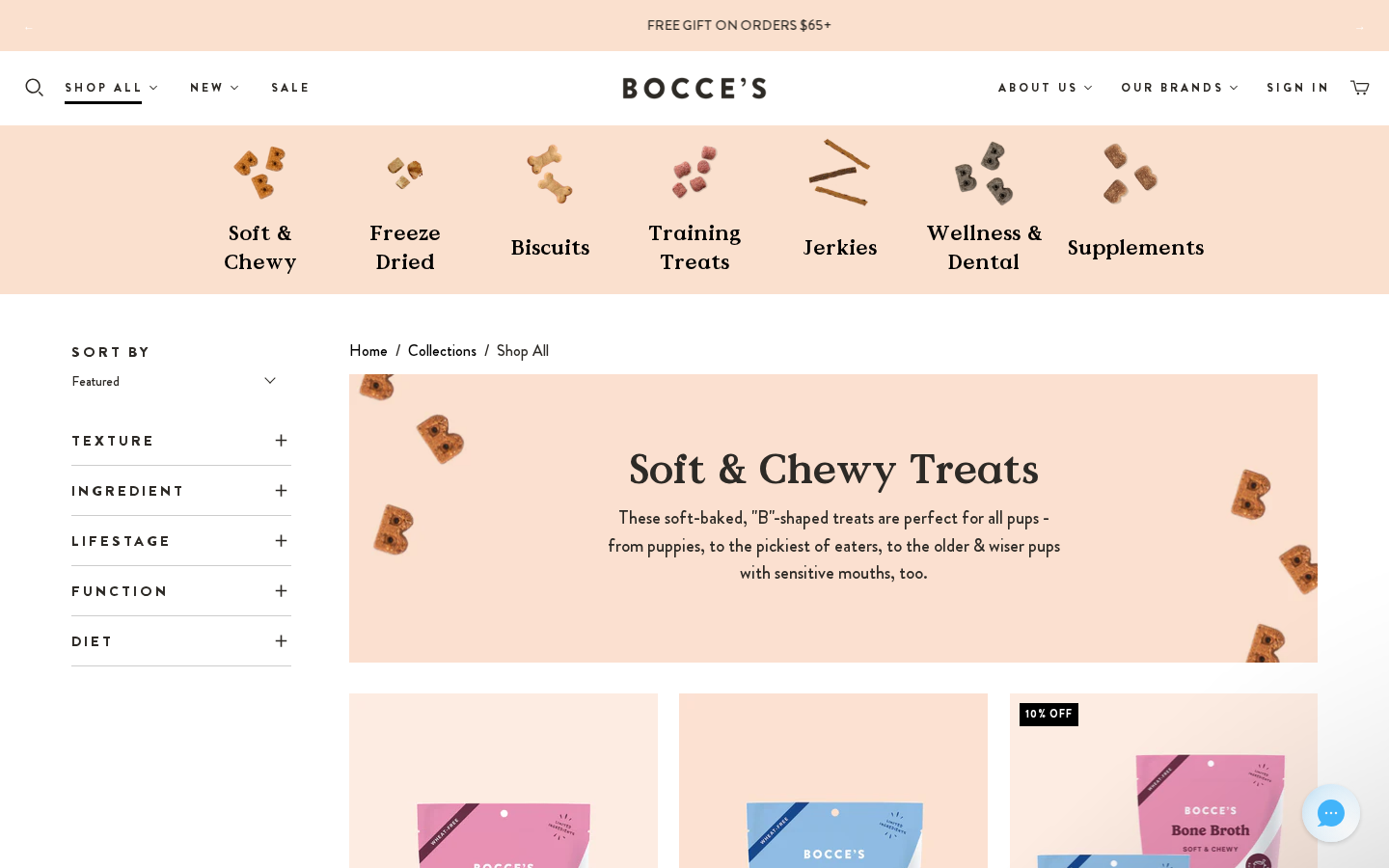
Every main shopping collection (Shop All, Shop Dog, New, Cat, and the category pages) uses one JSON template per collection. Each of those templates renders the same static-collection-filters section: the "Collection Category Page" in the customizer.
The PLP has:
- a metafield-driven headline + subcopy;
- sort + product count;
- device-specific filter groups;
- a collapsible Filters panel on mobile;
- mobile-specific sub-collection thumbnails;
- a 4-per-row grid by default.
Page structure
Files: sections/static-collection-filters.liquid (schema) → snippets/collection-category-filters.liquid (markup) → snippets/product-item.liquid (cards)
Top to bottom, when the collection is on its default sort:
- PLP headline (
snippets/plp-headline.liquid): anh1in Value Serif plus a subcopy block, from the collection metafieldscustom.headline_copyandcustom.subcopy. Nothing renders when both are blank. - Sub-collection navigation: one thumbnail + label per Featured Sub-Collection block, linking to anchors further down the page. It scrolls horizontally on mobile.
- Sidebar: Sort By (title and created-date sorts are hidden) + a "N Products" count + the tag filters.
- Sub-collection listings: each Featured Sub-Collection block renders a hero banner (image on desktop,
banner_colorbackground on mobile) with title and description, then all products of that collection.
When the shopper picks a non-default sort, the page switches to a single flat grid of the parent collection, limited to rows × products_per_row products.
Breadcrumbs & /collections
/collections(thelist-collectionstemplate) redirects to/collections/shop-all. It outputs a meta refresh pluswindow.location.replace, and is markednoindex, follow.- The "Collections" breadcrumb on collection pages and PDPs links to
/collections/shop-all(plain text on Shop All itself). The JSON-LD breadcrumb (snippets/structured-data.liquid) matches.
Section settings
| Setting | ID | Type | Default | Shop All (current) |
|---|---|---|---|---|
| Show breadcrumbs | show-breadcrumbs | checkbox | true | true |
| Show top title | show-top-title | checkbox | false | false |
| Show collection image | show-collection-image | checkbox | — | false |
| Rows | rows | range 1–11 | 6 | 6 |
| Number of products per row | products_per_row | range 2–4 | 4 | 4 |
| Enable sorting | enable-sorting | checkbox | false | true |
| Enable sidebar | collection-sidebar | checkbox | false | true |
| Collection sidebar menu | collection-sidebar-menu | link_list | — | collections |
Block: Featured Sub-Collection (feature)
| Setting | ID | Type | Notes |
|---|---|---|---|
| Collection | collection | collection | Products listed in this group; its handle is the anchor |
| Header Navigation Thumbnail | header_image | image | Nav thumbnail (desktop) |
| Header Navigation Thumbnail: Mobile | header_image_mobile | image | Optional, falls back to the desktop thumbnail |
| Hero Banner | banner | image | Desktop only |
| Mobile Banner Color | banner_color | color | Default #FDECE2 |
| Featured Subcollection Title | title | text | Overrides the collection title |
| Featured Subcollection Description | description | richtext | |
| Description: Mobile Only | description_mobile | richtext | |
| Navigation Title | nav_title | text | Short label under the thumbnail |
The legacy static-collection-category-1 … -20 sections have the same header_image_mobile setting.
Blocks: filters
| Block | Setting | ID | Notes |
|---|---|---|---|
Filter group title (filter_parent) | Title | text | Group heading, e.g. "Texture" |
| Show on | device | both / desktop / mobile | |
Filter within group (filter_childs_group) | Filter group title | parent | Must match a filter_parent title exactly |
| Tag text to show instead of tag | tag_label | Checkbox label | |
| Tag Name | tag_name | Product tag to match |
How filtering works (src/vue/components/render/filter-options.vue): filtering happens client-side on the products already rendered, using each card's data-product-tags.
- Within a group, tags are OR. Across groups they are AND.
- A tag is only listed if at least one product on the page has it. Each group shows the first 10 tags, then View More.
- Sub-collection heroes with no visible products are hidden. "No products found. Please remove some filters" appears when nothing matches.
- Mobile (below 720px): filters collapse behind a Filters toggle.
devicedecides which groups appear on each breakpoint, and the component rebuilds the groups when the viewport crosses the breakpoint.
Current filter setup (Shop All / Shop Dog / New)
The same six groups and 26 tags are used on the main templates:
- Texture:
texture-crunchy,texture-softchewy,texture-training,texture-jerky,texture-supplement - Ingredient:
ingredients-banana,-cheese,-peanut-butter,-bacon,-beef,-chicken,-duck,-salmon - Lifestage:
lifestage-puppy,lifestage-senior - Function:
function-calming,-dental,-digestion,-hipjoint,-skincoat,-immunesupport - Diet:
low-calorie,Vegetarian,low-fat - Pet Type:
pet-dog,pet-cat
To add a filter, tag the products, then add a Filter within group block with the exact tag.
Collection templates
| Template | Sub-collections (nav labels) |
|---|---|
collection.shop-all.json | Soft & Chewy, Jerkies, Training Treats, Freeze Dried, Halloween, Biscuits, Food Toppers, Wellness & Dental, Supplements |
collection.shop-dog.json | Soft & Chewy, Biscuits, Freeze Dried, Food Toppers, Training Treats, Jerkies, Wellness & Dental, Supplements |
collection.new.json | Sprinkled Froyo, NFLPA, Protein Jerky, Bocce's Spa, Wellness, Freeze Dried, Training, Post Workout Smoothie, Valentine's Recipes, Soft & Chewy |
collection.cat.json, biscuits, soft-chewy, jerky, training-treats, wellness, special-edition, halloween-treats, dynamic-filters | Category pages on the same section |
collection.collection-page-no-banner.json | Same section, currently disabled |
Legacy .liquid templates (not editable as JSON):
| Template | Section |
|---|---|
collection.liquid (default) | dynamic-image-with-text + static-collection |
collection.category-1 … category-20 | static-collection-category-1 … -20 |
collection.cats.liquid | static-collection-cats |
collection.filters.liquid | static-collection-filters |
collection.subcollection-list.liquid | static-subcollection |
static-collection, static-collection-basic and static-collection-cats also render the PLP headline (plp-headline-wrapper).
To assign: Shopify Admin > Products > Collections > [Collection] > Theme template.
Product card
Snippet: snippets/product-item.liquid. It is shared by the PLP, sub-collection lists, dynamic-collection, the NFLPA PLP grid and B's search grid.
| Element | Source / logic |
|---|---|
| Brand line | product.pet_flag metafield, else vendor (show-brand-names) |
| Title | Product title |
| One-liner | Product metafield custom.one_liner, up to 2 lines. See Product one-liner |
| Rating | "4.8 ★★★★★ (1.2k)", with counts of 1,000 and up abbreviated. It comes from the metafields junip.rating_average / junip.rating_count, not a live API call. If the product has Amazon or Chewy reviews (reviews.amazon_reviews / reviews.chewy_reviews > 0), the blended reviews.blended_rating / reviews.blended_count are used instead |
| Write a review | When the count is 0, the rating slot shows a Write a review link that opens the Junip on-site review form in a new tab |
| Price & sale | See below |
| Add to cart | Static ATC button with instant add to the drawer. Out-of-stock products show FIND STORE (find-store setting); custom.find_in_store_option = "Buy Online" shows SHOP ONLINE (link from custom.not_in_store); custom.oss = true forces OUT OF STOCK. Bundles (bundles.items_in_bundle) count as out of stock when any item has fewer than 5 in inventory |
| Hidden | Products tagged internal_only are never rendered |
The rating widget is hydrated by window.__theme.junip.junipRating() (snippets/helper-theme-global-js.liquid). layout/theme.liquid re-runs it every 2 s so cards injected by AJAX also get stars. A MutationObserver keeps the Junip SDK from wiping them.
Sale pricing & "See Discounted Price in Bag"
- "On sale" means the product is in the
salecollection (snippets/on-sale-check.liquid). Compare-at price alone doesn't count. - On-sale products get the
saleprice style. The compare-at price shows struck through only when it is higher than the price. - On-sale products also show "See Discounted Price in Bag" (
snippets/discount-note.liquid, locale keyproducts.product.discounted_price_in_bag). The SALE30 automatic discount only applies in the cart, so the storefront price is the full price. It appears on product cards, search results and the PDP.
Theme B difference
Theme B also strikes through the compare-at price on any product whose compare-at is above its price, whether or not it is in sale. This covers the PLP, the search page and the live search. Theme A uses the sale-collection rule only.
Other collection sections
| Section | File | Notes |
|---|---|---|
| Collection Basic | static-collection-basic.liquid | Simplified layout with the PLP headline |
| Subcollection | static-subcollection.liquid | Nested subcollection display |
| Collection List | static-collection-list.liquid / dynamic-collection-list.liquid | /collections itself redirects to Shop All |
| Tradeshow | static-tradeshow-2-collection.liquid, static-tradeshow-2-collection-list.liquid | Tradeshow page |